
Interactive

Open source · MIT · MCP server

TextRig.
Animate a PNG
with your agent.

Hand Claude Code, Cursor or any MCP client one flat image and a sentence — “make him breathe”, “wave hello”. The agent cuts the image into pieces, places bones, writes keyframes, renders the result, checks its own work and iterates. No PSD layers required, no Spine license.
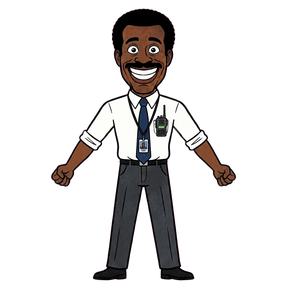
The flat source drawing: a cartoon manager, one PNG
Input: one PNG

Output

DragonBones rigs, rendered by the tool

Every clip below was built and rendered by TextRig from the examples in the repo. The output is a standard DragonBones triple that runs in Pixi, Phaser, Cocos, Unity and more.

One flat PNG → 10 pieces, 12 bones
Your own layers → 17 pieces, 11 animations
Rigid limbs and a deforming hose

How it works

The agent draws, code does the math

Look
The agent reads the image and decides what should move.
Mark up
It writes a skeleton, polygon cuts and keyframes as small JSON documents. Optional: a browser editor lets you drag joints, move cuts and send a note back to the agent.
Build
TextRig cuts the pieces, fills the art hidden behind moving joints, binds meshes to bones and writes a DragonBones rig.
Check
It renders a filmstrip; the agent inspects it against a checklist and fixes what looks wrong.
Ship
Standard DragonBones _ske.json + _tex.json + _tex.png. Already have layers? TextRig uses them as pieces.

Install

Three lines to install

macOS or Linux, Python 3.10+, Node 18+ with pnpm. About 1.5 GB on disk with dependencies and model weights.

git clone https://github.com/blackoutbuild/textrig
cd textrig && ./install.sh
claude mcp add textrig -- "$PWD/mcp/serve.sh"

Other MCP clients: point a stdio server at mcp/serve.sh. Full docs in the README.

Who made it

Built for our own slots

We wrote TextRig to animate mascots and symbols in the games we ship for Stake Engine publishers. Need a game, not a tool? See the rate card or message @blackout_interactive.